Deadly Days: Roadtrip How to Get Duct Tape and Apples
Every source of Duct Tape and Apples in Deadly Days: Roadtrip, including Apple Juicer costs, MKing Response bonuses, achievements, and base unlock costs.

Duct Tape and Apples are the two permanent base currencies in Deadly Days: Roadtrip: Duct Tape pays for one-time Workbench unlocks such as base systems, item packs, and banishing tiers, while Apples pay for incremental Bookshelf stat upgrades, character item stickers, and extra Duct Tape through the camp Apple Press. You earn Duct Tape from boss encounters,  Reaper kills, achievement rewards, and the Apple Press, while Apples come from end-of-run ratings, achievements, and in-run drops.
For the full run structure and backpack fundamentals before planning your unlocks, start with the Deadly Days: Roadtrip beginner guide.
How to Get Duct Tape
Collecting your first Duct Tape unlocks the base Workbench, where permanent one-time upgrades become available. On the route screen, mission tooltips display available Duct Tape rewards before you choose your next stop.
- Boss kills and MKing Response Level scaling: roadtrip bosses drop +1 bonus Duct Tape starting at MKing Response Level 3 and +2 bonus Duct Tape starting at level 5, with MKing Response Level capping at level 6.
- Headquarters end boss: defeating
 Director Bottomline carries a base drop of 3 Duct Tape, lowered from 5 in the full release.
- Weekly Challenge runs: every Weekly Challenge runs at MKing Response Level 5, putting its boss fights in the +2 bonus Duct Tape tier.
- Defeating the Reaper: killing Reaper during a run drops 1 Duct Tape.
- Achievement rewards:
 Handyman is a base-camp achievement paying 1 Duct Tape when you buy your first one-time Workbench unlock, while
 Corporate Restructuring triggers when you destroy your first headquarters and lists Duct Tapes as its reward.
- Camp conversion: the base Apple Press turns surplus Apples into Duct Tape on demand.
Losing or abandoning a roadtrip before defeating its first boss lowers your MKing Response Level by 1, which can pull your runs back below the level 3 or level 5 Duct Tape bonus thresholds.
What Duct Tape Buys at the Workbench
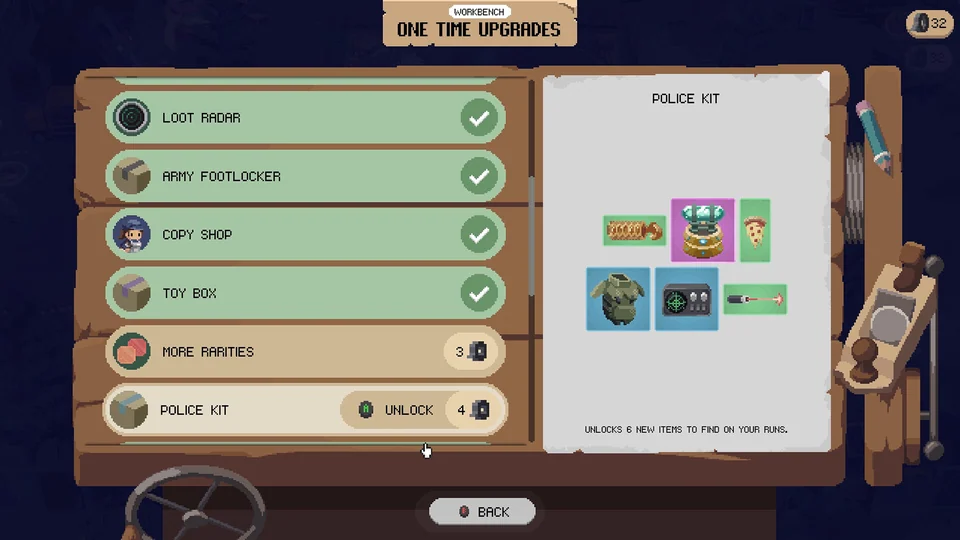
Every one-time upgrade at the base Workbench costs a flat number of Duct Tape rolls and permanently unlocks a base feature, extra banishing slots, or an item pack adding 6 items to your run pool. You can filter every unlock and inspect each pack’s full item roster on the base unlocks and upgrades page.
Base Features and Item Banishing
| Unlock | Duct Tape | Prerequisites | Effect |
|---|---|---|---|
 Merchant |
1 |  Moonshine Crate |
Adds the shop stop between missions to spend scrap on items |
 Item Workbench |
1 | Moonshine Crate |
Enables recipe crafting directly inside your backpack |
 Airdrop Reroll |
2 | Moonshine Crate |
Lets you reroll airdrop rewards with Dice and starts runs with +1 Dice |
 Merchant Reroll |
2 | Merchant and Airdrop Reroll |
Lets you reroll Merchant stock with Dice and starts runs with +2 Dice |
 Loot Radar |
1 |  Expedition Kit |
Separates crates from fuel on the minimap and shows crate rarity |
 Copy Shop |
1 |  Army Footlocker (full game) |
Adds a stop between missions to pay scrap and clone one backpack item |
 More Rarities |
3 |  Toy Box |
Combines 2 matching Epic items into Super and Legendary into Mythic |
 Costume Shop |
4 | Moonshine Crate and Multiple personalities (full game) |
Adds a stop between missions where you buy character items |
 Shady Merchant |
4 | Merchant and More Rarities (full game) |
Lets the vendor appear in missions to sell one Special item per visit |
 Item Banishing |
4 |  Cookie Tin or  Junk Drawer (full game) |
Opens the base Radio Tower to banish unwanted items per character |
 Item Banishing II |
5 | Item Banishing (full game) |
Expands per-character banish capacity at the Radio Tower |
 Item Banishing III |
6 | Item Banishing II (full game) |
Grants the highest banish capacity tier at the Radio Tower |
Across all three Radio Tower tiers, Item Banishing expands capacity from 3 to 6 to 12 items per character (raised from 2, 5, and 10 in Early Access), keeping banished picks out of airdrops, shops, and loot zombie drops. The camp coffee stand is not a Duct Tape purchase: unlock the coffee bike through  Wake-up call by losing 2 runs at night so you can start runs with
 Coffee in your loadout.
Item Packs
Each item pack at the Workbench adds 6 items to your run loot pool and opens further branches of the unlock tree.
| Item Pack | Duct Tape | Prerequisites | Items Added |
|---|---|---|---|
| Moonshine Crate |
1 | Available from start | 6 |
| Expedition Kit |
1 | Moonshine Crate |
6 |
| Army Footlocker |
2 | Moonshine Crate |
6 |
| Toy Box |
2 | Expedition Kit or Army Footlocker |
6 |
 Police Kit |
4 | Toy Box (full game) |
6 |
 Toolbox |
4 | Toy Box (full game) | 6 |
 Shoebox |
5 | Police Kit or Toolbox (full game) |
6 |
| Cookie Tin |
5 | Shoebox (full game) |
6 |
| Junk Drawer |
5 | Shoebox (full game) | 6 |
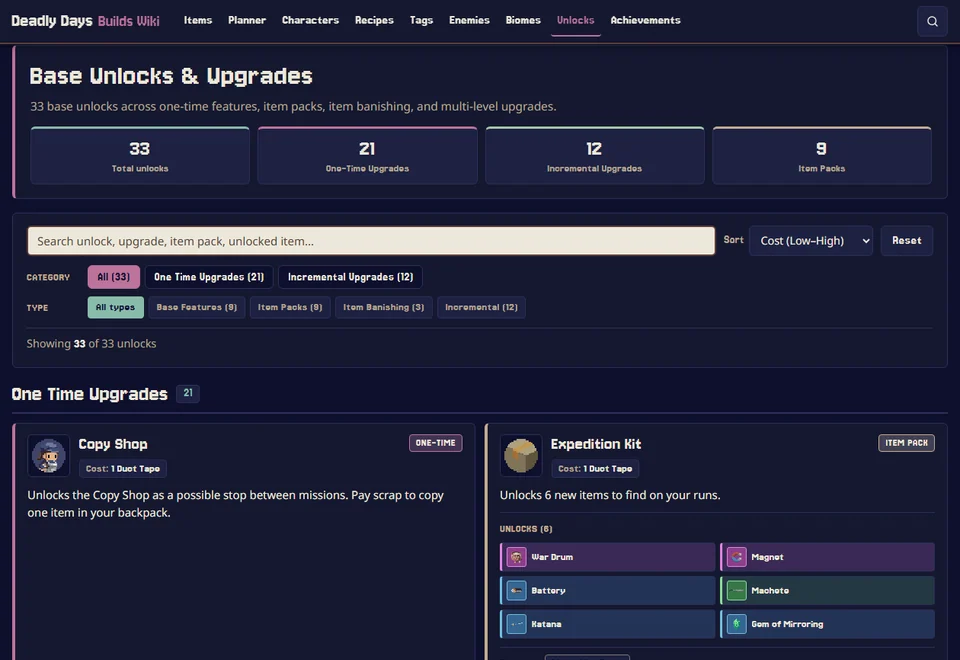
Workbench unlocks marked as full game stay locked in the demo; see the save file location and demo transfer guide for carrying saves over.
How to Get Apples and Apple Press Scaling
Collecting your first Apple unlocks the base incremental upgrade system, and completed runs pay out Apples on the end-of-run rating screen.
- End-of-run ratings: the run summary scores zombies killed, days survived, bosses killed, maximum threat reached, minutes survived at night, and achievements unlocked, with victory multipliers for winning a run or shutting down a regional HQ.
- MKing Response Level bonus: the round-end screen grants a +5% Apple bonus per response level, scaling up to the level 6 cap.
- In-run pickups and loot zombies: Apples also drop during missions, including drops from Apple loot zombies.
- Achievement payouts: base-camp achievements with a direct Apple reward pay 25 or 50 Apples at camp, while run achievements score on the end-of-run Achievements Unlocked rating row (25 Apples base per unlock, multiplied by 2x, 4x, or 5x on harder milestones for 50, 100, or 125 Apples).
At base camp,  Self improvement and
 Banana Banana pay 25 Apples directly while
 Character development pays 50 Apples; during runs, standard milestones such as
 A step up and boss clears like
 Beat Scoop count for 25 Apples on the Achievements Unlocked rating row, whereas harder goals like
 Craft them all,
 Paper trail, and
 Express service carry a 2x multiplier on that row for 50 Apples. The two largest run-rating multipliers belong to
 Book closed (4x on the Achievements Unlocked row, worth 100 Apples) and
 The winning collection (5x on that row, worth 125 Apples); see the Book Closed and The Winning Collection guide for full completion steps. Browse every currency and unlock reward in the Achievements directory.
Apple Press (Apple Juicer) Scaling
At camp, the Apple Press converts Apples into Duct Tape whenever you need extra rolls for Workbench unlocks. When the Apple Juicer first arrived in Early Access, each conversion doubled the price exponentially, whereas version 1.0 switched Apple Press pricing from doubling to a rounded Fibonacci progression. Because every trade still raises the next asking price, check the press cost before trading away Apples needed for Bookshelf stats or character item upgrades.
What Apples Buy: Bookshelf Upgrades and Character Stickers
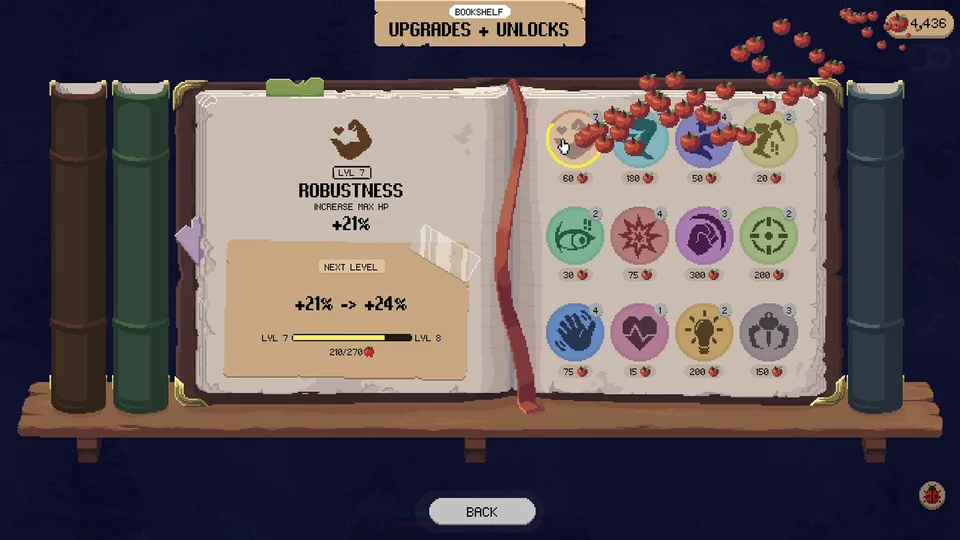
At the base Bookshelf, Apples buy multi-level permanent stat upgrades arranged across three rows, where investing in upgrades above unlocks the next row down. Unlike flat Duct Tape unlocks, incremental upgrade prices follow a scaling curve across their levels rather than a fixed per-level fee.
| Upgrade | Row | Max Levels | Effect |
|---|---|---|---|
 Robustness |
First | 10 | Raises maximum health |
 Fast calves |
First | 10 | Raises movement speed |
 Finger Length |
First | 10 | Expands loot pickup range |
 Reflexes |
First | 10 | Raises weapon attack speed |
 Sharp eyes |
Second | 10 | Raises critical hit chance |
 Forceful Impact |
Second | 10 | Raises critical damage above the 150% base |
 Brute Force |
Second | 5 | Raises melee weapon damage |
 Deadeye |
Second | 5 | Raises ranged weapon damage |
 Quick Hands |
Third | 10 | Improves reload speed and melee attack speed |
 Cardio |
Third | 10 | Speeds up stamina recovery |
 Fast Learner |
Third | 5 | Raises experience gained |
 Salvager |
Third | 5 | Raises scrap found during runs |
Apples also buy persistent character item stickers on the character selection screen to upgrade each survivor’s signature item across runs. You can reset character item upgrades for a single character or for every character at any time to refund all spent Apples.
Recent Currency Balance Changes
- Before full release, the Bookshelf row-locking rework flattened the late-game incremental upgrade curve to cut total Apple costs by roughly 20%.
- Version 1.0 gave Workbench item packs distinct names with adjusted unlock requirements and costs, and added base camp Apple and Duct Tape payouts with a pickup effect for achievements.
- A post-launch update stopped the Apple counter from appearing on the end-of-day screen (restricting it to the end-of-run screen) and resolved threat-clock jumps at very high Apple totals.